


Resident Center
4.51.54K Reviews
App Specs
- Version
- 1.5.15
- Updated On
- License
- Free
- Downloads
- 500,000+
- Developer
- Buildium
- Categories
- House & Home
- Platform
- Android, iOS
Screenshots
 Analysis by AppCompare
Apartment life is full of small tasks that become annoying when they are scattered across paper notices, emails, and trips to the office. The useful question with a resident portal is not whether it can replace every conversation, but whether it makes routine housing matters easier to handle from a phone. Resident Center, made by Buildium, is designed for that practical role: it brings resident-facing property tasks together, while still depending on your property manager to make the service available and keep its information current.
That dependence shapes the experience more than a polished screen can. If your building uses the platform consistently, having payment and maintenance details in one place can cut down on back-and-forth. If the office relies on other channels or responds slowly, the app cannot fix that process by itself. I would think of it as a convenient front door to property management, not a replacement for the people and procedures behind it.
Where a phone connection matters
Resident Center is most useful at the moment you need to check something or send it along: confirming a payment, describing a repair, or catching a community notice. Those tasks naturally rely on a working connection, because the app needs to communicate with the property’s account and services. I would avoid treating a submitted request as proof that someone has already seen or resolved it; for an urgent issue, use the contact method your property manager identifies for emergencies.
A practical habit is to write down the essentials of a maintenance problem before opening the request form: where it is, when it started, and what you have already noticed. If the app lets you attach a photo, a clear picture can make the issue easier to understand, but it should supplement—not replace—a concise description. This is especially helpful for intermittent problems, such as a leak that appears only after using a fixture. You can explain the pattern rather than sending a vague message that may lead to follow-up questions.
Resident Center is a free House & Home app with an Everyone age rating. It has a 4.5 average from around 23,000 ratings and more than 500,000 installs. Those figures suggest that many residents have tried it, but they do not guarantee that every property uses every part of it in the same way. I’d check whether your management company supports the app before building your routine around it.
Useful in the middle of an ordinary day
The strongest use case is not an elaborate one. Imagine you notice a loose cabinet hinge before leaving for work. Instead of hoping you remember to mention it later, you can note the details and submit a maintenance request when you have a moment. If you are also waiting for a building announcement, a resident portal can give you one place to check rather than searching through old messages. That small reduction in memory work is where a tool like this earns its keep.
It can also help households divide responsibilities. One person might usually handle rent while another notices repairs or reads community updates. A shared understanding of what has been submitted, paid, or announced can prevent duplicated effort, though I would not assume that every household member automatically has the same access or account setup. Before relying on that arrangement, ask the property office how residents in one household should sign in and who can see or manage each item.
Worth Reading Before You Choose

EA SPORTS FC Mobile 26 Is a Bigger Football Game, but It Takes Time

Flipboard Shows What News Apps Must Do Beyond the Feed

Switching to Android Auto Means Rethinking Your Driving Routine

Google Calendar Makes a Crowded Week Easier to Manage

Ludo King Makes the Most of the Minutes Between Plans

Baby Panda World Brings Quick Play to Modern Phones, but Its Game Library Feels Busy
The app is especially appealing if you prefer handling routine admin in short bursts instead of calling during office hours. It is less compelling if you rarely use a smartphone for housing tasks, if your property communicates reliably through a channel you already prefer, or if you expect immediate, two-way conversation. In those cases, a phone call or direct message to management may be faster and clearer.
What connectivity changes on the go
Because the app is built around current account information and communication with the property, I would use it when I have a dependable internet connection, particularly for payments or time-sensitive requests. In a basement parking area, elevator, or spotty reception zone, it is sensible to wait until you can confirm that an action completed rather than tapping repeatedly. For a payment, check the account afterward for its status and keep whatever confirmation the app presents; for a request, make sure it appears as submitted before assuming the office has received it.
This is also a reason to handle a task before the last possible moment. If you know a payment or request needs attention, doing it when your connection is stable leaves room to verify the result and contact management if something looks wrong. I would not plan around being able to complete a task offline. For a message that is urgent, a direct call is the safer choice than relying on a mobile app while your signal is unreliable.
There is a useful trade-off here: a single resident portal can reduce scattered communication, but it can also become one more place to check if management continues to post notices elsewhere. I’d ask which channel is authoritative for payment records, maintenance follow-up, and building announcements. Knowing that in advance prevents the common frustration of checking the app for an update that was actually sent through another route.
First Impressions and Usability
Downloading the Resident Center app is straightforward. It’s available on both Android and iOS, so no one’s left out. Once you’ve got it on your phone, the clean and intuitive interface is the first thing that stands out. Everything is neatly organized, making navigation a piece of cake. I didn’t need a manual or a degree in rocket science to find my way around.
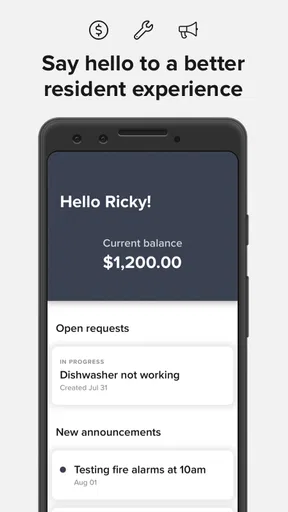
Logging in is simple, especially if your property management has already set you up with an account. If not, it’s just a quick sign-up process. Once you’re in, the dashboard gives you a snapshot of your account, pending payments, and any community announcements. It’s like having a virtual assistant dedicated to your housing needs.
Features That Make Life Easier
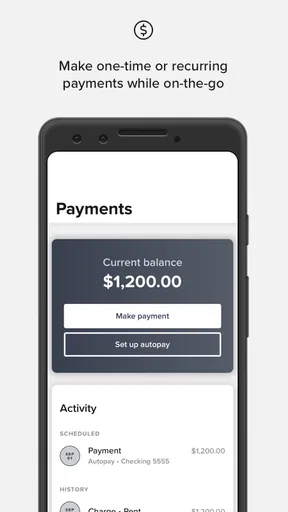
One of the biggest selling points of this app is its ability to handle rent payments. Gone are the days of writing checks or making trips to the leasing office. With just a few taps, you can pay your rent directly from your phone. You can even set up automatic payments to ensure you never miss a due date. It's a game-changer for those of us who tend to forget these things!
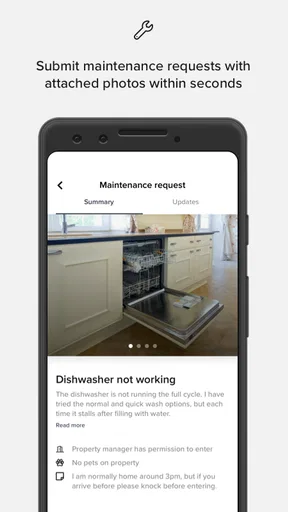
Maintenance requests are another highlight. Instead of leaving sticky notes or trying to catch the maintenance team in the hallway, you can submit requests straight through the app. It allows you to describe the issue, attach photos, and even track the progress of your request. Now, that’s what I call efficient!
Community Connection
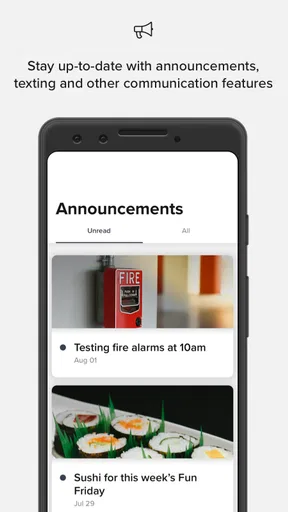
Resident Center isn’t just about handling payments and maintenance; it’s also about fostering a sense of community. The app includes a section for community announcements and events, keeping you in the loop about what’s happening in your neighborhood. Whether it’s a holiday party or a garage sale, you’ll never have to worry about missing out on the fun.
There’s also a directory of residents, which is pretty handy if you’re trying to remember the name of that friendly neighbor you keep running into. It’s these small touches that really enhance the community feel.
Security and Privacy
Of course, with all this personal information floating around, security is a top concern. The app employs robust security measures to ensure your data is safe. I felt confident knowing that my payment information and personal details were protected. Plus, the app doesn’t bombard you with ads or third-party promotions, which is a big plus in my book.
What Could Be Better?
While Resident Center offers a lot, it’s not without its hiccups. Some users have reported occasional bugs, like the app freezing or certain features not loading properly. However, these seem to be rare and are usually resolved with updates.
Another area for improvement could be the communication feature between residents and management. While you can send messages, a chat feature for instant communication would be a welcome addition. It’s not a deal-breaker, but it would enhance the user experience.
Choosing the right channel for follow-up
For a non-urgent repair, the portal’s main advantage is keeping the issue attached to your resident account rather than leaving it in a conversation you may later struggle to find. I’d make the first report specific, then use the available status information as a record of progress. If the problem changes—say, a small drip becomes a steady leak—send an updated message or contact the office directly instead of assuming the original request communicates the new urgency.
That approach also helps when you need to follow up without starting from scratch. Keep the original wording factual and include the room or location, what is affected, and whether the problem is ongoing. Photos can clarify visible damage, but they may not explain a sound, smell, or intermittent fault. A short written explanation of what you observed is often more useful than a dramatic close-up that lacks context.
For building-wide information, the app is most useful when residents actually check it. I would make a habit of looking at announcements when handling another task, rather than expecting every update to arrive at exactly the right moment. If a notice concerns access or a schedule change, verify the details with management when they are unclear. A community feed can centralize information, but it cannot make an ambiguous announcement clearer on its own.
Payments, records, and practical safeguards
Automatic payments can take one recurring chore off your mind, but convenience is not the same as set-and-forget. I’d still review the account after a payment and keep an eye on the balance and timing. If you change how you manage household expenses, make sure the person responsible knows whether a payment is scheduled or already completed. That simple check can prevent two people from acting on different assumptions.
Residents may also wonder whether using the app means they no longer need to contact the leasing office. I wouldn’t treat it that way. The portal is a useful route for ordinary account tasks and documented requests, while the office remains the better source for questions about a lease, an unusual charge, urgent access, or a request that appears stuck. If a task is important, use the channel your property says to use and keep a record of the response.
There is a modest data-conscious advantage to using one established resident account instead of sending personal or payment details through informal messages. Still, I would avoid sharing login details with another household member. If someone else needs access, ask management about the proper account arrangement rather than forwarding credentials. It is a more sensible way to keep responsibility clear and avoid confusion over who submitted a request or changed an account item.
How it compares with familiar alternatives
Compared with paper forms, in-person visits, or a chain of emails, a property portal can make routine tasks easier to find and revisit. Its value is strongest when the management team uses the same system to receive requests and post updates. A phone call can still be better for a complicated conversation, and a direct emergency contact is more appropriate when waiting for a portal response would be risky. I see Resident Center as a convenient complement to those channels, not a universal substitute for them.
It also differs from general note-taking or payment apps because it is tied to a resident relationship and the property’s own workflow. That connection can save effort, but it means the experience is not wholly in the resident’s hands: access and usefulness depend on the property’s setup. If your building does not use the platform, or if management rarely updates it, a simple calendar reminder and the office’s preferred contact method may serve you better.
Buildium’s app is on version 1.5.9, and it was released on August 7, 2019. I’d keep it updated, since a current version is a sensible first step if something fails to load. If a problem continues, checking your connection and signing in again may help with a temporary issue; if the account or a property-specific item is still wrong, management is the right place to ask. Repeatedly submitting the same payment or request is not a good recovery strategy, because it can create confusion rather than make the original action complete.
Overall, the app is a solid tool for anyone living in a residential community. It simplifies many of the tasks that can make adulting feel overwhelming. With its user-friendly interface and practical features, Resident Center is definitely worth checking out. Whether you’re a busy professional, a parent juggling family life, or just someone who appreciates convenience, this app has something to offer.
So there you have it! Give Resident Center a spin and see how it can transform your living experience. It might just become your new favorite tool for managing life at home.
My connectivity verdict
For me, the best reason to use this app is not that it removes every bit of housing admin, but that it can give payments, repair reports, and resident information a more orderly home. The main limitation is equally clear: a mobile portal is only as useful as the connection, property setup, and follow-through behind it. I’d recommend trying it if your management team supports it and you want a straightforward way to handle everyday resident tasks. Keep another contact route for urgent matters, confirm important actions in your account, and use the app as a practical aid rather than your only line to the property.
Pros
- User-friendly interface for easy navigation.
- Real-time updates on maintenance requests.
- Secure online payment options available.
- Comprehensive lease management tools.
- Push notifications for important reminders.
Cons
- Limited features for non-resident users.
- Occasional glitches in the payment system.
- Requires constant internet connection.
- Limited customization options in settings.
- No offline access to documents.
FAQs for Resident Center
What is Resident Center and what does it offer?
Resident Center is a comprehensive app designed for residents of apartment complexes. It offers features such as rent payment, maintenance requests, community announcements, and resident communication. The app aims to streamline interactions between residents and management, providing a convenient platform for managing everyday needs within the community.
Is Resident Center available on both Android and iOS platforms?
Yes, Resident Center is available for both Android and iOS devices. Users can download the app from the Google Play Store or the Apple App Store, ensuring accessibility for most smartphone users. It is designed to be user-friendly across different devices, ensuring a smooth experience regardless of your operating system.
How secure is my personal information on Resident Center?
Resident Center prioritizes user privacy and security. The app employs encryption and other security measures to protect your personal and financial information. Regular updates and compliance with industry standards further ensure that your data is safeguarded against unauthorized access or breaches.
Can I submit maintenance requests through Resident Center?
Yes, one of the key features of Resident Center is the ability to submit maintenance requests directly through the app. This feature allows you to report issues promptly and track the progress of your requests, providing convenience and efficiency in addressing maintenance concerns within your living space.
Does Resident Center have a feature for community announcements?
Absolutely! Resident Center includes a feature for community announcements, allowing management to communicate important updates or events to all residents. This ensures that you stay informed about community activities, safety alerts, or any changes in policies, enhancing your overall living experience.


